Mesh & Meshing
This chapter describes how to configure mesh-related options in NekRS and outlines common workflows for generating, importing, and modifying meshes. For practical guidance on mesh quality and refinement strategies, see Meshing Tips.
A quick overview:
Runtime Setup to load and modify meshes, boundary tags and connectivity
Generate simple meshes with Nek5000 Meshing Tools
Convert External Meshes from Gmsh, Exodus II, and CGNS
Related topics:
Moving Mesh setup
Conjugate Heat Transfer meshes
On-the-fly h-Refinement
Overview of mesh_t
Runtime Setup
Meshes are stored in the binary re2 file, which contains the coordinates and boundary tags. Several aspects of the mesh can still be adjusted at runtime in a flexible way.
Coordinates Modification
Like Nek5000, NekRS allows mesh coordinates to be modified at runtime.
Static, one-time deformations are typically applied during initialization in
usrdat2 in the usr file or UDF_Setup() in the .udf file.
In principle, any mesh point can be moved arbitrarily, as long as the mapping
remains valid—non-self-intersecting with a positive Jacobian. Below we show
examples of common operations implemented in usrdat2 (in the .usr file),
including uniform scaling for non-dimensionalization, rotations, and wall-normal
stretching.
In the pb146 example, the mesh is rescaled so that the radius of
pebbles are scaled from 1.5 to 1.0.
subroutine usrdat2
include 'SIZE'
include 'TOTAL'

! rescale to R_pebble = 1
n     = lx1*ly1*lz1*nelv
scale = 1.0/1.5
do i=1,n
  xm1(i,1,1,1) = xm1(i,1,1,1)*scale
  ym1(i,1,1,1) = ym1(i,1,1,1)*scale
  zm1(i,1,1,1) = zm1(i,1,1,1)*scale
enddo

return
end
In the tgv example, the mesh is rescaled to
\([-\pi,\pi]^3\):
subroutine usrdat2
include 'SIZE'
include 'TOTAL'

a = -pi
b =  pi
call rescale_x(xm1,a,b) ! rescale mesh to [-pi, pi]^3
call rescale_x(ym1,a,b)
call rescale_x(zm1,a,b)

return
end
In the shlChannel example, the domain is rotated by an angle
P_ROT:
subroutine usrdat2
include 'SIZE'
include 'TOTAL'
include 'CASEDATA'

call rescale_x(xm1, 0.0, 1.0)
call rescale_x(ym1,-1.0, 0.0)
call rescale_x(zm1, 0.0, 1.0)

ntot = nx1*ny1*nz1*nelt

do i=1,ntot
   xpt = xm1(i,1,1,1)
   ypt = ym1(i,1,1,1)

   xm1(i,1,1,1) = xpt * cos(P_ROT) - ypt * sin(P_ROT)
   ym1(i,1,1,1) = xpt * sin(P_ROT) + ypt * cos(P_ROT)
enddo

return
end
In the ktauChannel example, wall-normal refinement is introduced
using a hyperbolic tangent mapping:
subroutine usrdat2
include 'SIZE'
include 'TOTAL'

parameter(BETAM = 2.8)

call rescale_x(xm1, 0.0, 8.0)
call rescale_x(ym1,-1.0, 0.0)
call rescale_x(zm1, 0.0, 1.0)

ntot = nx1*ny1*nz1*nelt

do i=1,ntot
   ym1(i,1,1,1) = tanh(BETAM*ym1(i,1,1,1))/tanh(BETAM)
enddo
One can apply coordinate transformations in UDF_Setup(), and even
modify the mesh when starting from a restart file (see Initial conditions
for the initialization behavior). In the periodicHill example below, the
mesh coordinates are first brought to the host with
auto [x, y, z] = mesh->xyzHost(); and then copied back to the device via
mesh->o_x.copyFrom(x.data()); (and similarly for y and z).
Alternatively, the OCCA device arrays can be modified directly, either
using common utilities such as Linear Algebra Functions (linAlg) or a custom kernel.
auto mesh = nrs->meshV;
auto [x, y, z] = mesh->xyzHost(); // copy to host

for (int n = 0; n < mesh->Nlocal; n++) {
  x[n] = 0.5 * (sinh(betax * (x[n] - 0.5)) / sinh(betax * 0.5) + 1.0);
  y[n] = 0.5 * (tanh(betay * (2.0 * y[n] - 1.0)) / tanh(betay) + 1.0);

  x[n] = (x[n] - xmin) * xscale;
  y[n] = (y[n] - ymin) * yscale;
  z[n] = (z[n] - zmin) * zscale;

  x[n] = x[n] + amp * shift(x[n], y[n], Lx, Ly, W);

  auto yh = hill_height(x[n], Lx, W, H);
  y[n] = yh + y[n] * (1.0 - yh / Ly);
}
mesh->o_x.copyFrom(x.data()); // copy to device
mesh->o_y.copyFrom(y.data());
mesh->o_z.copyFrom(z.data());
Connectivity
In NekRS, connectivity is represented as an integer list of unique grid
points (glo_num in Nek5000). By tracking which elements reference which
grid points, the solver knows how elements are connected and which degrees of
freedom are shared between neighboring elements.
Apart from the pairing of periodic faces, the .re2 file does not store
this connectivity information. Instead, it must be supplied in a legacy
.co2 file (typically generated by the Nek5000 tool gencon), or it can
be constructed on-the-fly at startup using parCON (part of parRSB, an
in-house library), which builds the connectivity by matching vertex
coordinates within a tolerance.
This tolerance is defined relative to the local element edge length. If it is
too large, nearby vertices may be merged, short edges can collapse, and
elements become degenerate. NekRS starts with connectivityTol (set in
.par, default 0.2) and calls parCON up to three times, each time
reducing the tolerance by a factor of 10 until a valid, non-degenerate
connectivity is found. If the tolerance is too small, some elements can remain
disconnected from the rest of the mesh; in practice this often shows up as
unexpected extra nonzero boundary IDs where internal faces appear as external.
A typical parCON diagnostic output with two attempts looks like (the
element_check failed line is only a warning):
Running parCon ...
   /home/nekrs/build/_deps/nek5000_content-src/3rd_party/parRSB/parRSB/src/con.c:251 element_check failed.
Running parCon ...
parCon (tol = 1.000000e-03) finished in 10.049 s
At runtime, the user can still override the connectivity via the legacy
usrsetvert routine in the .usr file. This is often used for 2D cases
that are extruded in the \(z\)-direction with a single element and
periodic boundary conditions by copying the global vertex indices from one plane
(e.g., the bottom plane, iz = 1) to the other (the top plane, iz = nz),
as in the channel example:
subroutine usrsetvert(glo_num,nel,nx,ny,nz) ! modify glo_num
integer*8 glo_num(1)

! kludge for periodic bc in z
nxy  = nx*ny
nxyz = nx*ny*nz
do iel = 1,nel
   ioff = nxyz*(iel-1)
   do ixy = 1,nxy
      glo_num(ioff + nxy*(nz-1) + ixy) = glo_num(ioff + ixy)
   enddo
enddo

return
end
Nek5000 Meshing Tools
More details are available in the Nek5000 documentation. Here we briefly review the basic usage of these meshing utilities and illustrate them using existing NekRS examples. See Building the Nek5000 Tools for acquiring the tools.
genbox
Many simple meshes can start from one or more boxes and then be deformed later
in usrdat2 in the .usr file. For example, here is gabls1/input.box:
 1base.rea
 2-3                     spatial dimension  ( < 0 --> generate .rea/.re2 pair)
 31                      number of fields
 4#=======================================================================
 5#
 6#    If nelx (y or z) < 0, then genbox automatically generates the
 7#                          grid spacing in the x (y or z) direction
 8#                          with a geometric ratio given by "ratio".
 9#                          ( ratio=1 implies uniform spacing )
10#
11#    Note that the character bcs _must_ have 3 spaces.
12#
13#=======================================================================
14#
15Box
16-20  -20  -20                                        nelx,nely,nelz for Box
170 1 1.                                               x0,x1,gain  (rescaled in usrdat)
180 1 1.                                               y0,y1,gain  (rescaled in usrdat)
190 1 1.                                               z0,z1,gain
20P  ,P  ,W  ,v  ,P  ,P                                bc's  (3 chars each!)
The first line gives the base name for the legacy
.reafile that stores run parameters, which is not used in NekRS since it runs from the binary.re2format.The next line is the spatial dimension. For NekRS, you should always use
-3for 3D. The negative sign instructsgenboxto generate a binary.re2file.The third line sets the number of fields for the simulation.
Any line that starts with
#is a comment and is ignored bygenbox.The line starting with
Boxintroduces a new axis-aligned box. The following lines describe that box. Other leading characters (e.g.C,M) are also supported but are not covered here. See the Nek5000 genbox documentation.The first line after
Box(line 16) specifies the number of elements in the \(x\), \(y\), and \(z\) directions. A negative value tellsgenboxto generate the element distribution automatically along that axis using a geometric series. A positive value indicates that a user-specified distribution (given later in the file) should be used.The next three lines give the start and end coordinates and a geometric ratio for each Cartesian direction:
x0, x1, ratio(and similarly for \(y\) and \(z\)). A ratio of1yields uniform spacing; values different from1create a graded mesh (for example,ratio < 1to cluster points near the lower endpoint).The last line specifies the boundary tags for \(x_\text{min}, x_\text{max}, y_\text{min}, y_\text{max}, z_\text{min}, z_\text{max}\) in order. Each tag must be exactly three characters and will populate the
cbc(f,e,ifield)array. In this example,P ,P ,W ,v ,P ,Pcorresponds to periodic boundaries in \(x\) and \(z\), a wall at the lower \(y\) boundary, and a fixed-velocity (inflow) condition at the upper \(y\) boundary.
n2to3
The n2to3 tool extrudes a 2D mesh in the \(x\text{-}y\) plane into a
3D mesh by adding elements in the \(z\) direction. This is often useful
for channel, duct, or blade-passing cases where the cross-section is
described in 2D and a small number of planes (sometimes with periodic BCs)
are used in 3D. See Nek5000 n2to3 documentation
for detailed usage.
reatore2
Since NekRS does not support the legacy ASCII .rea format, you must use
reatore2 to convert Nek5000 .rea meshes to the binary .re2 format
and move runtime parameters into the .par file. See the Nek5000 reatore2
documentation for
detailed usage.
Convert External Meshes
Mesh conversion is handled by Nek5000 tools. See Building the Nek5000 Tools and the Nek5000 documentation for details. The table below summarizes commonly used external meshing software, their file formats, and the corresponding conversion tools.
Software |
Format |
Nek5000 Tool |
|---|---|---|
Gmsh |
.msh (version 2) |
gmsh2nek |
CGNS |
.cgns |
cgns2nek |
Cubit |
.exo |
exo2nek |
ANSYS / Fluent / ICEM |
.exo |
exo2nek |
Pointwise |
.exo |
exo2nek |
Note
Meshes converted from external formats use numeric side-set IDs, which
are stored in bc(5,f,e,ifield) (see Sidesets & Boundary Tags). Tools
such as gmsh2nek and exo2nek can read any text-based IDs from the
source mesh, but these names are not used internally by NekRS.
Gmsh (gmsh2nek)
Before converting a Gmsh .msh file with gmsh2nek, ensure that it meets
the following requirements:
NekRS requires HEX20 elements. Before exporting your
.mshfile, create these elements by using “Mesh → Set order 2” in the Gmsh GUI. Alternatively, use theSetOrdercommand or the-order 2option on the command line. See the Gmsh documentation for details.Export the mesh as a Version 2
.mshfile. Both ASCII and binary formats are supported, but binary is recommended for large meshes. When exporting via the GUI, do not enable any additional checkboxes; simply select Version 2 (ASCII or Binary) from the drop-down menu and complete the export.NekRS does not support 2D simulations. While
gmsh2nekcan export 2D meshes for use with Nek5000, these 2D meshes are not compatible with NekRS. See n2to3 and Connectivity for constructing a minimal single-layer 3D mesh.Ensure that sidesets and periodic boundaries are defined correctly in Gmsh. See the section on Sidesets & Boundary Tags.
gmsh2nek will guide you through the conversion process with interactive
prompts. When asked, you can also merge a solid-domain mesh that is conformal
with the fluid-domain mesh, which is useful for setting up Conjugate Heat Transfer
cases.
Exodus II (exo2nek)
The exo2nek tool converts Exodus II .exo meshes to the native .re2
format.
The following element types are supported:
HEX20
TET4 + WEDGE6
TET4 + WEDGE6 + HEX8
TET10 + WEDGE15
TET10 + WEDGE15 + HEX20
For hybrid meshes, exo2nek automatically converts tetrahedral and wedge
elements to hexahedra. See Tet-to-Hex for details. The tool can
also construct a conjugate heat transfer mesh from two conformal meshes, one for
the solid domain and one for the fluid domain. For sideset and boundary
condition setup, see Sidesets & Boundary Tags.
Tet-to-Hex
As NekRS supports only hexahedral elements, exo2nek can split tetrahedral
and wedge elements into hexahedra while preserving conformity with neighboring
HEX elements. The supported conversions are
TET4 + WEDGE6 (Exodus) -> HEX8 (Nek)
TET4 + WEDGE6 + HEX8 (Exodus) -> HEX8 (Nek)
TET10 + WEDGE15 (Exodus) -> HEX20 (Nek)
TET10 + WEDGE15 + HEX20 (Exodus) -> HEX20 (Nek)
Exodus meshes can be generated by tools such as Cubit, ANSYS ICEM, and Pointwise. In the conversion, each tetrahedral element is mapped to four hexahedral elements (tet-to-hex), and each wedge element is mapped to six hexahedral elements (wedge-to-hex). HEX20 elements in the Exodus mesh are split into eight Nek HEX20 elements to remain conformal with neighboring elements. These conversions are supported for both first- and second-order elements.
Moving Mesh
Dynamic mesh motion is supported through a moving-mesh solver based on the
Arbitrary Lagrangian–Eulerian (ALE) framework. Given a prescribed mesh velocity
on one or more moving boundaries, the solver updates the volume mesh by solving
the ALE equations with a mesh-deformation diffusion parameter that controls how
the boundary motion is blended into the interior of the domain. For an example,
see the mv_cyl case.
Alternatively, you can control the mesh deformation directly by setting
solver = user in the [MESH] block. In this mode, it is your
responsibility to ensure that the effects of mesh motion are consistently
included in the fluid and scalar equations.
Conjugate Heat Transfer
NekRS can simulate conjugate heat transfer when it is provided with a solid mesh that is conformal to the fluid-domain mesh. As illustrated in Fig. 13 of Computational Approach, you must provide meshes for both the fluid domain \(\Omega_f\) and the solid domain \(\Omega_s\), and then merge them using the meshing tools.
Legacy .rea meshes can be merged using the Nek5000 utilities prenek or
nekmerge (you can use re2torea and reatore2 to convert between
.re2 and .rea formats). For externally generated meshes, the converters
gmsh2nek and exo2nek also support merging the fluid and solid domains as
part of the conversion step.
Within NekRS, element types can be identified via mesh->elementInfo[e] or
mesh->o_elementInfo[e], which store 0 for fluid-domain elements and
1 for solid-domain elements. These tags can be used to set up material
properties (see CHT Properties Setup) and to define region-specific forcing
terms.
We also recommend following the tutorial Conjugate Heat Transfer as a starting point.
h-Refinement
This option performs an on-the-fly global mesh refinement. Each element edge is split into \(N_{\text{cut}}\) uniform segments, so the total number of elements increases by a factor \(N_{\text{cut}}^3\). The refined mesh is built by high-order tensor-product interpolation and preserves the original boundary conditions, connectivity, and partitioning.
To use this feature, set the refinement schedule in the .par file, as shown
below for \(N_{\text{cut}} = 3\). See Fig. 2 for a 2D
illustration.
[MESH]
hrefine = 3

Fig. 2 h-refinement demo. Each element (red) of a 4×4 2D mesh is refined into 3×3 smaller elements, resulting in 144 elements.
Refinement is applied before usrdat2, so users can still adjust mesh
coordinates and boundary conditions as described in
mesh setup. Multiple rounds of h-refinement are also
supported. See Table 19 for examples.
Par keys |
Rounds |
Refinement(s) |
\(E_{new} / E_{old}\) |
|---|---|---|---|
|
1 |
\(N_{\text{cut}} = 2\) |
\(2^3\) |
|
2 |
\(N_{\text{cut}} = 2\) then \(3\) |
\(6^3\) |
|
2 |
\(N_{\text{cut}} = 3\) then \(2\) |
\(6^3\) |
|
1 |
\(N_{\text{cut}} = 4\) |
\(4^3\) |
|
2 |
\(N_{\text{cut}} = 2\) then \(2\) |
\(4^3\) |
|
3 |
\((N_{\text{cut}} = 2)\ \times\) 3 times |
\(8^3\) |
Note
The order of the refinement schedule matters. Because elements are not
renumbered, hrefine=2,3 produces a different element numbering than
hrefine=3,2. The same rule applies to the restart option below.
Note
Because the partitioning is not recomputed, \(h\)-refinement can introduce load imbalance of up to \(N_{\text{cut}}^3\) elements per rank.
The restart option also works with h-refinement so you can reuse solutions on
refined meshes. Each checkpoint stores up to four refinement steps in its header.
On restart, NekRS compares the h-schedule in the .par with the
h-schedule stored in either the *0.fXXXXX or the .bp file and applies
any required refinement to the fields. A checkpoint is valid as long as its
h-schedule is an ordered subset of the h-schedule requested for the new run.
See the table and diagram below for an example.
Simulations |
Input mesh |
|
Output size |
|---|---|---|---|
0 |
|
(none) |
\(E\) |
1 |
|
3 |
\(3^d E\) |
2 |
|
3,2 |
\(6^d E\) |
3 |
|
(none) |
\(6^d E\) |
4 |
|
2 |
\(12^d E\) |
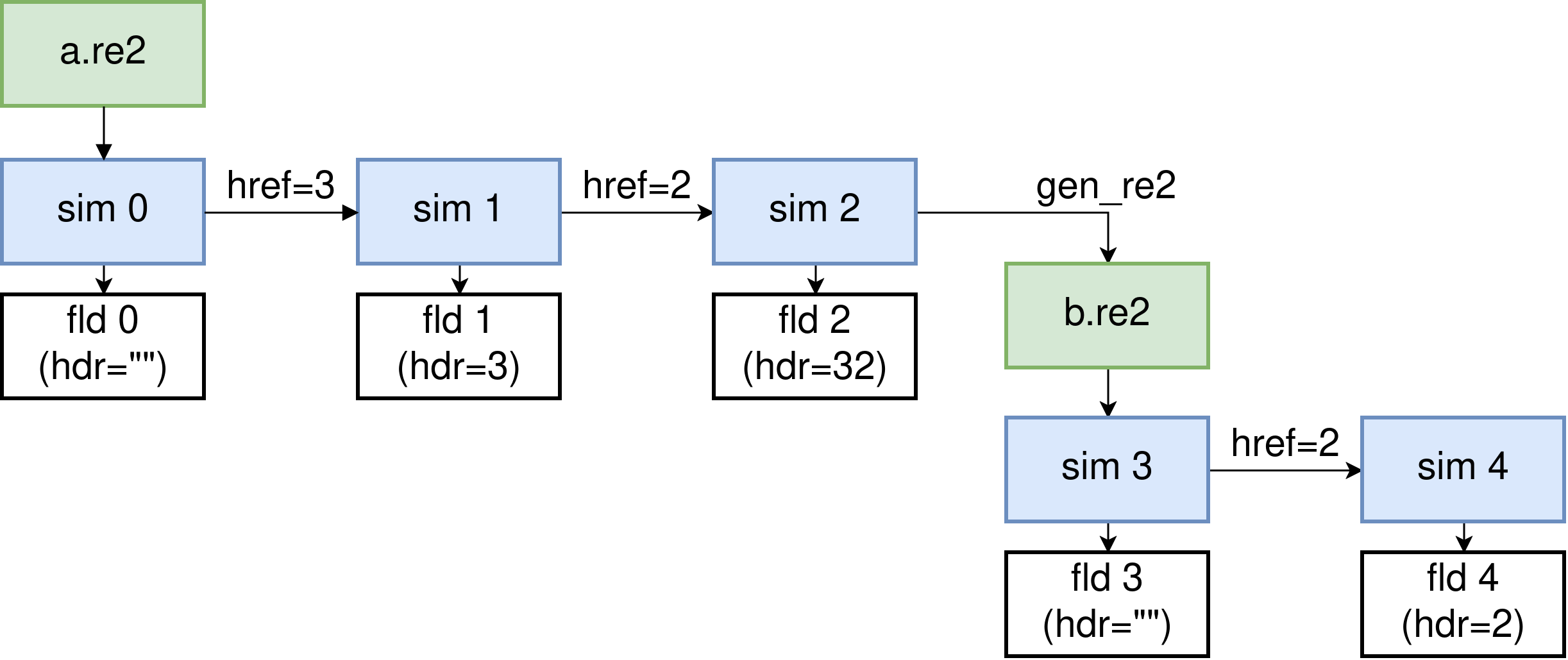
Fig. 3 Restart diagram for h-refinement. Starting from the top-left a.re2
(green), each simulation (blue) dumps a checkpoint file (white) whose header
shows the stored h-schedule. After writing a new b.re2, the schedule is
reset and older checkpoint files are no longer compatible.
Sim 1 |
Sim 2 |
Sim 3 |
Sim 4 |
|
|---|---|---|---|---|
fld 0 |
ok |
ok |
Not supported |
Not supported |
fld 1 |
ok |
ok |
Not supported |
Not supported |
fld 2 |
NA |
ok |
Not supported |
Not supported |
fld 3 |
NA |
NA |
ok |
ok |
Note
The h-refinement restart option can be combined with other restart options
except int.
Miscellaneous Tips
Because high-order meshes place more degrees of freedom in each element, they typically use far fewer elements than lower-order CFD solvers. The quantity to monitor is therefore the total number of degrees of freedom, which depends on both the element count and the polynomial order. As a resource and performance metric, we use \(\mathrm{dof} = E N^3\), where \(E\) is the number of elements and \(N\) is the polynomial order.
Note
Each element contains \((N+1)^3\) GLL points, so the raw storage scales like \(\mathcal{O}(E (N+1)^3)\). However, many points are shared across element interfaces, so we define the effective number of degrees of freedom as \(\mathrm{dof} = E N^3\) for performance estimates.
Mesh refinement in higher-order finite elements can be performed in two ways:
h-refinement: adding elements
p-refinement: increasing the polynomial order of the elements
In practice, we rely on both to achieve an effective mesh resolution. Regions
where the flow cross section changes abruptly, where separation occurs, or where
the flow transitions (such as reactor plena) are good candidates for
h-refinement. After obtaining converged results with a low polynomial order
(e.g., N = 3), it is a good idea to switch to p-refinement and check
whether the quantity of interest chosen for the mesh-refinement study continues
to converge as the polynomial order increases. This process can be iterative:
as one learns more about the flow physics, the need for additional
h-refinement may become apparent when p-refinement alone fails to produce
mesh convergence.
Note
For sufficiently smooth solutions, projecting onto piecewise polynomials of degree \(N\) on elements of size \(h\) in 3D yields a local truncation error of order \(\mathcal{O}(h^{N+1})\) under h-refinement (with \(N\) fixed). Since \(h \sim E^{-1/3}\) and \(|\Omega| \approx E h^3 = \mathcal{O}(1)\), the global \(L^2\)-error also scales as \(\mathcal{O}(h^{N+1})\).
When the solution is analytic on each element and the mesh is fixed, the coefficients in a modal Legendre polynomial expansion \(u(x) = \sum_{k=0}^\infty\ \hat{u}_k\ \phi_k(x)\) decay geometrically with respect to the polynomial degree. That is, there exist constants \(C>0\) and \(0 < \rho < 1\), independent of the mesh and \(N\), such that
The geometric decay of the modal coefficient implies that the trucation error decreases exponentially with \(N\), typically written as \(\|u - u_N\| \lesssim C \exp(-\alpha N)\) for some constants \(C, \alpha > 0\), in an appropiate norm (e.g., \(L^2\) or \(H^1\)).
High-order meshes can also tolerate element shapes that would be considered low
quality in many low-order finite-element solvers. Depending on the physics,
average aspect ratios of 20 or more can be acceptable. However, care must be
taken to avoid overly small elements that are typical of low-order meshes,
because NekRS will allocate N+1 Gauss–Lobatto–Legendre (GLL) nodes per
element in each coordinate direction. This can easily lead to an excessive
number of degrees of freedom. While the polynomial order can be reduced for such
meshes (for example, when small geometric features impose element-size
limitations), NekRS generally performs best when operating at higher
polynomial orders (e.g., N >= 5).
Note
Combined with efficient matrix-free tensor-product operators of cost \(\mathcal{O}(E N^4)\) (without forming the full dof-by-dof system), high-order spectral elements typically offer better accuracy per dof and better scalability on modern distributed architectures that favor high compute intensity and data locality.
While increasing \(N\) generally improves accuracy per dof, using extremely high polynomial orders can become counterproductive:
In finite-precision arithmetic, round-off error eventually dominates and limits the attainable accuracy.
On GPUs, very large \(N\) increases register and shared-memory pressure, which can reduce occupancy and overall performance.
For these reasons, NekRS caps the polynomial order at \(N \le 10\), which provides a good balance between accuracy, robustness, and performance on modern architectures.
Note
For convection-dominated simulations, the timestep is constrained by the convective CFL condition. Because the minimum spacing of GLL points scales as \(\Delta x_{\min} \sim h / N^2\), mesh refinement (either decreasing \(h\) or increasing \(N\)) requires a corresponding reduction of \(\Delta t\) to maintain a fixed CFL number.
In practice, for LES and DNS where temporal resolution is critical, \(\Delta t\) is often chosen smaller than the CFL-limited value.